Documentation
algod.top is one binary with three parts:
algod.topis a terminal UI in the style oftop.algod.top daemoncollects metrics, status and log events from each node and keeps them for as long as you choose.- The daemon serves a web UI from files built into the binary.
Capturing data comes first. The daemon never drops or delays a sample to serve a viewer.
Install
go install algod.top@latestThis builds the program into $(go env GOPATH)/bin, or into $GOBIN when it is set. To try it without installing, run go run algod.top@latest. Flags pass through, as in go run algod.top@latest -d ~/.mainnet.
- It needs Go 1.27 or later. An older
gocommand downloads the 1.27 toolchain by itself. - There are no version numbers. Every commit on main is a release, and
algod.top versionsays when it was made, such as2026-11-04 12:35 UTC (37f0e9db), 3 days old. See Upgrading to update. - It uses no cgo and needs nothing at run time. It runs on Linux, macOS and Windows, on amd64 and arm64.
- Every release also has binaries for each platform on GitHub, named such as
algod.top_linux_amd64, withchecksums.txtand its signature. Check a download withsha256sum -c checksums.txt --ignore-missing.algod.top upgradeandalgod.top remote installcheck the signature themselves. - To build for a server from your laptop, leave
GOBINunset and set the target.GOOS=linux GOARCH=amd64 go install algod.top@latestwrites~/go/bin/linux_amd64/algod.top.
Quick start
algod.top                              # find the nodes on this machine and show them live
algod.top -d ~/.mainnet                # one data directory
algod.top -u http://127.0.0.1:4001     # a REST URL; tokens from $ALGOD_TOKEN and $ALGOD_ADMIN_TOKEN
algod.top -u ssh://relay.example.com/var/lib/algorand   # a node on another host, nothing installed there
Discovery looks at running algod processes, at data directories in your home directory such as ~/.mainnet, and at /var/lib/algorand. Without a daemon, the terminal UI shows live values only. To keep history, run the daemon:
algod.top daemon --discover   # find local nodes, write them to the config file, and run
algod.top                     # now shows the daemon's data, with history
The web UI is then at http://127.0.0.1:8090. The daemon can run in a terminal or tmux, or as a service that starts at login or boot (see Running as a service).
Terminal UI
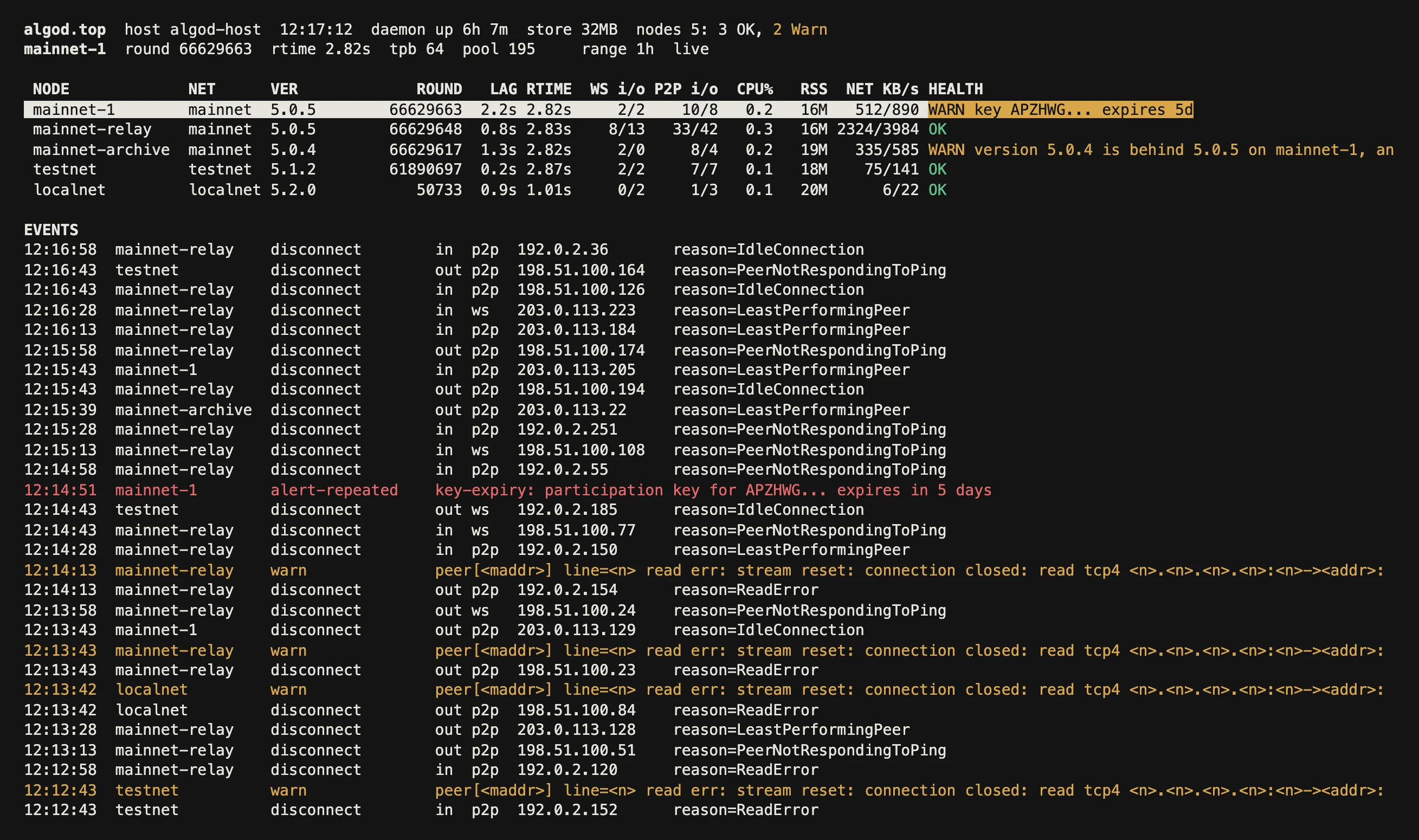
The terminal UI connects to the local daemon when one is running, and shows its history. Otherwise it polls algod itself. --live skips the daemon even when one is running.
| Key | Does |
|---|---|
Up Down Enter Esc | Select a node, open it, go back |
PgUp PgDn Home End | On a node, scroll the open pane. Up and Down scroll it too. |
< > | Change the sort column |
p e l | Peers, events or log templates pane |
r | Cycle the range: 1h, 6h, 24h, 7d, 30d, 1y, all |
f | Toggle full resolution |
[ ] | Move the time cursor back or forward one bucket |
t | Jump to a time, for example 2026-11-03 09:30 |
Space | Pause or resume live updates |
a | Add an annotation at the cursor |
s | Silence alerts for the selected node |
/ | Filter rows |
W | Write discovered nodes to a config file, after showing it |
? q | Help, quit |
Batch mode suits scripts and cron. algod.top -b prints the node table once. -n 5 -i 10 prints it five times, 10 seconds apart, and --json prints JSON.
To view a daemon on another machine, use algod.top -H ssh://host. It runs ssh host algod.top stdio and opens no port. -H https://host:8090 works with a read-only token in --hub-token-file or $ALGODTOP_TOKEN.
Daemon and web UI
algod.top daemon runs the collectors, the store, health checks and alerts, the API and the web UI. It listens on 127.0.0.1:8090 by default. Set web.listen in the config, or pass -l ADDR. An empty value turns the web UI off.

| Page | Shows |
|---|---|
| Fleet | Every node as a card or a table row, with its health reasons, round, peers and recent bandwidth and round time. Peer counts need the admin token and show n/a without it. |
| Node | Live values with their change from 24 h ago, and synchronized charts in sections. An event lane marks restarts, config changes and alerts. |
| Peers | Current connections, the history of each remote address, and inbound peers that disconnected together. |
| Events | A timeline and a filterable table of events, annotations and silences. You can add annotations and silences here. The CSV link downloads the events of the range, node and kinds shown. |
| Compare | Two time ranges of one node aligned at their start, or two nodes over one range, with mean, p50, p99 and the difference. |
| Explorer | Any stored metric with a label filter, for questions no chart anticipated. |
| Settings | Nodes, retention and access. Editing nodes and retention here needs web.allow_config_edits. |
A listener on loopback needs no password. Any other address needs one:
algod.top passwd              # the full password
algod.top passwd --read-only  # a password that can only look
algod.top passwd --token      # a read-only bearer token for scripts and -H https://
For HTTPS, set web.tls to "self-signed", or set web.tls_cert and web.tls_key.
algod.top reload and SIGHUP reload the nodes, alerts and retention. A change of listen address needs a restart. The daemon runs at a low CPU and I/O priority. In a ten-minute test with five nodes, it used about half a percent of one core, 53 MB of memory and 8 KB/s of disk writes.
Configuration
The config is one JSON file. It holds tokens and the password hash, so keep it mode 0600.
| Platform | Default path |
|---|---|
| Linux, macOS | ~/.config/algodtop/config.json (or $XDG_CONFIG_HOME/algodtop on Linux) |
| Windows | %APPDATA%\algodtop\config.json |
| Linux system service | /etc/algodtop/config.json |
-c PATH or $ALGODTOP_CONFIG picks another file. This one watches two Mainnet nodes, a Testnet node and a local network, and alerts a phone through ntfy:
{
  "nodes": [
    {"name": "mainnet-1", "datadir": "~/.mainnet", "accounts": ["<your account address>"]},
    {"name": "mainnet-relay", "url": "ssh://relay.example.com/var/lib/algorand"},
    {"name": "testnet", "datadir": "~/.testnet"},
    {"name": "localnet", "url": "http://127.0.0.1:4001", "token_file": "~/localnet/algod.token"}
  ],
  "retention": {"raw": "30d", "1m": "1y", "10m": "5y", "1h": "forever"},
  "alerts": [
    {"name": "down", "expr": "down or stalled", "for": "1m", "channels": ["phone"]},
    {"name": "keys", "expr": "rule:key_expiry_warn", "channels": ["phone"]}
  ],
  "channels": {"phone": {"type": "webhook", "url": "https://ntfy.sh/your-topic"}}
}| Node field | Meaning |
|---|---|
name | The name shown everywhere. Data is stored under it. |
datadir | A local algod data directory. algod.top reads the address and tokens from it, and follows a port change after a restart. |
url | An http:// or https:// REST URL, or ssh://host/<datadir>. Set exactly one of datadir and url. |
token_file, admin_token_file | Tokens for a REST URL. token and admin_token hold them inline. |
accounts | Accounts to watch: online status, incentive eligibility, votes and key expiry. |
scrape_interval, peers_interval | Override the defaults of 10 s for metrics and 30 s for peers. |
backfill_logs | Read the existing node.log and archive on first start. |
disabled | Keep the node in the file without watching it. |
algod.top check validates the file and each alert rule, reaches each node, and projects the disk the store will use. algod.top check --notify also sends a test notification on every channel.
Nodes on other hosts
algod.top reaches other hosts through the system ssh, so ~/.ssh/config aliases, ProxyJump and ssh-agent all work. It always uses BatchMode=yes, so run ssh host once to accept a new host key. There are three ways to watch a node elsewhere.
A REST URL
"url": "https://host:8080" with a token. It gives status, metrics and peers, but no process stats or node.log.
SSH with nothing installed
"url": "ssh://[user@]host[:port]/var/lib/algorand". A path that starts with /~/ is in the remote home directory. algod.top reads the data directory files over SSH and reaches algod's REST port through ssh -W. The host needs cat and a POSIX shell, so it must run Linux or macOS. There are no process stats or log events, and data has gaps while the hub is offline.
An agent on the host
An agent is the daemon without rollups or a web UI. It collects on the host, including process stats and node.log, and buffers 7 days. The hub pulls from it over SSH, so the hub catches up after an outage with no gap. Alerts for an agent's nodes run on the agent. The hub adds one alert of its own: "agent unreachable".
On the hub, run algod.top remote install host, then algod.top reload. It copies a signed release to the host, shows the agent config it would write, and installs the agent as a service. When algod runs as its own account, as package installs do, the agent must run as that account, which takes a system service and root, once:
- It asks whether you become root on that host with
suorsudo, and remembers the answer. - It shows the command, such as
ssh -t host 'su -c "$HOME/.local/bin/algod.top service install --system --agent"', and runs it once you agree, so you type the password in your terminal. - It then records the agent in the hub config.
On a Windows host, remote install installs the agent as a Windows service over SSH. The SSH account must be an administrator, whose OpenSSH sessions Windows runs elevated.
An agent installed some other way joins with algod.top remote add host, which checks that the agent answers before it saves anything. The hub names agent nodes <remote>/<node>. If the hub already watched that host over SSH, remote add offers to replace that node. The agent's node then takes over its name and history. algod.top remote sync and remove cover the rest, and Upgrading covers new releases.
Running as a service
algod.top service explains the service for the machine it runs on, and prints the file it would write. algod.top service install writes that file, enables it and starts it. uninstall and status cover the rest. Every service restarts the daemon after a failure and runs it at a low priority. Add --agent for the agent instead of the daemon.
| Platform | Service |
|---|---|
| macOS | A launchd user agent, ~/Library/LaunchAgents/top.algod.daemon.plist. It starts at login and logs to ~/Library/Logs/algodtop.log. |
| Linux, algod runs as you | A systemd user unit, ~/.config/systemd/user/algodtop.service. It starts at login, or at boot after sudo loginctl enable-linger $USER. Logs: journalctl --user -u algodtop. |
| Linux, algod runs as another account | A system service like algorand.service, from sudo algod.top service install --system. See below. |
| Windows | A Windows service, from algod.top service install in an elevated prompt. See below. |
A package install runs algod as the algorand account from /var/lib/algorand. The system service does the same: it runs as the owner of the data directory, from boot.
- It reads
/etc/algodtop/config.json, written from discovery when the file does not exist, and keeps its data in/var/lib/algodtop. - It copies the binary to
/usr/local/bin/algod.topfor people to run, and points an old/usr/local/bin/algodtopat it. - The service runs its own copy,
/var/lib/algodtop/bin/algod.top, owned by the account it runs as, soalgod.top upgradecan replace it without root. - It creates an
algodtopgroup that may use the service's socket, and adds the person running the install to it. Members can use the terminal UI without sudo after they log in again.
Running algod.top daemon in a terminal or tmux needs no service. The install refuses while such a daemon uses the same store.
On Windows, run algod.top service install, or algod.top service install --agent, from PowerShell or Terminal opened with Run as administrator. It finds the nodes on the machine, including those FUNC runs from go-algo-win, and registers a service that starts at boot:
- It runs as LocalSystem, so it can read the figures of an algod that FUNC runs under its own service account.
- It keeps its config, socket, store, its own copy of algod.top and its log in
C:\ProgramData\algodtop, orC:\ProgramData\algodtop-agent, open only to SYSTEM and Administrators. Use the terminal UI and CLI from an elevated prompt. - The service manager restarts it after a failure, and after
algod.top upgradeinstalls a new release. - Its log is
log\algod.top.login that directory.
Upgrading
On the hub, run:
algod.top upgradeIt installs the newest release on this machine, restarts the daemon onto it, and then does the same for every agent in the hub config. --version names another release, and --local leaves the agents alone. Each daemon and agent installs the release itself:
- The hub downloads the release and sends it over the SSH connection it already uses, so servers need no internet access.
- The daemon or agent checks the release signature with its own built-in key, and refuses a release older than the one it runs.
- It replaces its binary and restarts in the same process, so systemd and launchd see no change. A Windows service stops, and the service manager starts it again on the new binary. The agent buffers meanwhile, so the hub misses no data.
An agent installed as a system service before this release runs a binary that root owns, so it needs root once more. algod.top upgrade says so, copies the release to the host, and runs the service install there with your su or sudo, as for a new agent. After that, upgrades need no root.
The daemon looks for a newer release once a day. When one exists, the status line of both UIs and the Settings page say so. Set "update_check": false in the config to stop the check. The daemon never upgrades by itself.
Health
Each node is OK, Warn or Critical, and lists its reasons in words, such as "participation key for ABC... expires in 6 days".
Critical
- algod is down, or
/healthfails. A local algod that stops answering while its process runs is named with its pid, since it is hung rather than stopped. - The last round is older than 30 s and the node is not in catchup. A node whose round cannot be read, for example because algod rejects the API token, counts from the first failure, and the reason names the error.
- The disk has less than 5% free.
- An account's active participation key expires within 2 days. A renewed account's old key does not count.
- A watched account was online and is now offline or suspended.
- A watched online account's installed key is not the vote key registered on chain.
- A watched online account has not voted for over 10 times its expected interval, which comes from its share of online stake.
- The clock is more than 1 s off.
Warn
- Catchup is running.
- No round has been read yet because
/v2/statusfails. This becomes Critical after 30 s. - An account's active key expires within 14 days.
- A watched account lost incentive eligibility.
- The disk will fill within 14 days.
- The node has no outgoing peers.
- The error log rate is above its baseline.
- The node runs an older release than another node on the same network and release channel. Developer builds take no part.
- algod.top itself missed scrapes, dropped series, paused writes or deleted data at the disk floor.
Alerts and silences
An alert rule has a name, an expression and the channels to notify. It fires once the expression has been true for for, and clears once it has been false for cooldown, so it does not flap. A firing alert repeats every repeat, 1 h by default. Every change is stored as an event.
| Field | Meaning |
|---|---|
name, expr | The rule's name and expression. |
for, cooldown, repeat | Durations such as 1m or 2h. cooldown defaults to the longer of for and 1 minute, and repeat to 1 h. |
severity | The severity sent with the alert: info, warn, error or critical, the default. |
channels | Channel names from channels. |
nodes | Limit the rule to these nodes. Empty means every node. |
Expressions are fixed functions, not a query language:
- A comparison, such as
lag > 30s,peers_out < 1,disk_free_pct < 10%orrss > 8gib. - A state:
down,stalled,catchuporagent_unreachable, joined withor. health >= warn, or any health rule by name, such asrule:key_expiry,rule:no_votesorrule:clock.
Comparisons take lag, round_time, round_p99, cpu, rss, disk_free_pct, disk_days, peers, peers_out, peers_in, pool, tpb, error_rate, clock_offset, key_days, net_in and net_out.
Channels
"channels": {
  "phone": {"type": "webhook", "url": "https://ntfy.sh/your-topic", "template": "{{.Node}}: {{.Message}}"},
  "mail": {"type": "smtp", "smtp": {"addr": "smtp.example.com:587", "from": "algod.top@example.com",
           "to": ["ops@example.com"], "username": "algod.top", "password_file": "~/.config/algodtop/smtp.pw"}},
  "desktop": {"type": "command", "command": ["/usr/local/bin/notify-alert"]}
}
A webhook POSTs the alert as JSON, or as the output of its Go template, with any headers. A command gets the same JSON on stdin:
{"alert": "down", "node": "mainnet-1", "state": "firing", "severity": "critical",
 "message": "algod is down (REST unreachable: connection refused)", "since": 1793745203000000000,
 "time": 1793745263000000000, "host": "algod-host", "expr": "down or stalled"}
state is firing, repeat or cleared, or test from algod.top check --notify. A cleared notification repeats the message the alert fired with. Channels exist only in the config file. Neither UI nor the API can create or change one, because a command channel runs a program.
SMTP on port 465 uses TLS from the start. Other ports upgrade with STARTTLS when the server offers it. A webhook or SMTP delivery that fails is tried again after 10 s, 1 min and 5 min, unless a retry would fail the same way, such as a webhook that answers 404. A command runs once. A notification that never gets through shows as an alert-undelivered event on its node. Each channel delivers on its own, so a slow one does not hold up the others.
A rule that does not parse, or that reuses another rule's name, does not run. The daemon runs the other rules and records a config-error event. algod.top check reports such a rule before you start the daemon.
If the daemon or its machine dies, it can't send an alert. Set "heartbeat": {"url": "...", "interval": "1m"} to ping a healthchecks-style service, which alerts when the pings stop.
Silences
A silence stops notifications for chosen nodes and rules for a while. Health and events are still recorded.
algod.top silence --node mainnet-1 --for 15m "upgrade to 5.0.5"
algod.top silence list
algod.top silence rm ID
The terminal UI (s) and the web UI's Events page add silences too.
Storage
The daemon keeps its data in its own store, with no database to run.
| Platform | Store |
|---|---|
| macOS | ~/Library/Application Support/algodtop |
| Linux | ~/.local/share/algodtop, or $XDG_DATA_HOME/algodtop |
| Windows | %LOCALAPPDATA%\algodtop |
| Linux system service | /var/lib/algodtop |
store_dir in the config moves it. Data passes through four tiers, each kept for its own window:
| Tier | Resolution | Kept by default |
|---|---|---|
raw | Every sample | 30 days |
1m | 1 minute | 1 year |
10m | 10 minutes | 5 years |
1h | 1 hour | Forever |
With the defaults, one node settles at about 70 MB, plus under 1 MB a year for the hourly tier. algod.top check projects the size for your config. Peer sessions keep full addresses for a year (retention.peer_addresses), then only /24 totals. Warning and error log lines are kept 90 days.
When the disk falls to 5% free (disk.floor_percent), the daemon deletes the oldest data first and records it as an event. Set disk.at_floor to pause to stop writing instead.
algod.top export --node mainnet-1 --metric algodtop_round_time_seconds --from -24h > rounds.csv
algod.top export --node mainnet-1 --metric algod_network_p2p_received_bytes_total --fn rate --format json
algod.top export --events --node mainnet-1 --from -7d > events.csv
algod.top export --sessions --node mainnet-1 --format json
Commands
| Command | Does |
|---|---|
algod.top | Terminal UI |
algod.top daemon | Collector, store, health, alerts, API and web UI |
algod.top agent | Collector and local buffer on a remote host |
algod.top service | Explain, install, uninstall or report the service that starts the daemon |
algod.top remote | install, add, upgrade, sync or remove an agent on another host |
algod.top upgrade | Install the newest release here and on every remote agent |
algod.top export | Series, events or peer sessions as CSV or JSON |
algod.top silence | Add, list or remove silences |
algod.top reload | Reload the config, the same as SIGHUP |
algod.top passwd | Set the web password, or make a read-only token |
algod.top check [--notify] | Validate the config and alerts, reach each node, project disk use. --notify tests each channel |
algod.top stdio | Connect stdin and stdout to the local socket, for use over SSH |
algod.top version | Print the version |
Every command takes --help.
Security
- algod.top only reads. Its algod client sends GET requests to a fixed allowlist of paths, and sends the admin token only to the admin paths it needs.
- algod tokens never reach a browser or the terminal UI.
- The local socket is mode 0600, or 0660 for the
algodtopgroup of a system service. Anyone who can open it can already read the algod tokens. - The web UI binds to localhost. Another address needs a password, and every request that changes state needs a CSRF token.
- Alert channels live only in the config file, so no user of the UI can make the daemon run a program.
- SSH runs with
BatchMode=yes, so it never accepts an unknown host key or asks for a password.